Показаны сообщения с ярлыком vagrant. Показать все сообщения

воскресенье, 22 марта 2015 г.

Docker-Jenkins-Slave 2.0 (DJS2)

I often need to build some RPM or test my code on different operating systems that have different environment, libraries versions etc. On my host machine I use Arch Linux, but my job requires to write software for RHEL/CentOS. It's useful to use buildbots like Jenkins to run this builds on automated basis, commencing builds after any commit, whatever.

Anyway, installing jenkins on host machine and using Docker as slaves is useful, but can clog your computer with garbage files that hard to cleanup. DJS2 offers you isolated environment (LXC container) where your Jenkins and all Docker slaves are executed, and only jenkins data folder with jobs is stored on your computer.

So, if you need to test/build your code on different linux-based operating systems, all you need with DJS2 is only LXC-enabled Linux host machine and Vagrant.

You can get it here: https://github.com/rrader/docker-jenkins-slave

New version of DJS is already on GitHub. It's in beta and still not tested well, but is working on my PC. Try it on your PC and send me feedback, I'd be really pleased to see any feedback - about failures and successful runs as well.

It's really easy to deploy vagrant with different OS slaves on your local machine. Now CentOS 6 and CentOS 7 only available to use, but eventually all supported OSs will be migrated (as CentOS 5, Suse, Debian).

Pull-Requests are highly appreciated :)

Following text is part of README, it's instructions how to get Jenkins+Docker+LXC on your computer working.

Prerequisites


  1. Vagrant
Optional (but is really recommended)
  1. vagrant-lxc plugin: vagrant plugin install vagrant-lxc
  2. vagrant-lxc related configuration on Host. See https://github.com/fgrehm/vagrant-lxc/wiki 

Getting started

$ git clone git@github.com:rrader/docker-jenkins-slave.git djs
$ cd djs
$ ./djs.sh up
[lots of vagrant output ....]
==================================================
Jenkins should be available on 10.0.3.74:8080
Start using slaves with adding one
 e.g. # ./djs.sh add centos7-java Luke
Now you should be able to use your just deployed jenkins on http://10.0.3.74:8080 or similar
Now let's add some slaves with ./djs.sh add <image> <name>
$ ./djs.sh add centos7-java Luke
Unable to find image 'antigluk/jenkins-slave-centos6-java' locally
Pulling repository antigluk/jenkins-slave-centos6-java
[lots of docker output ....]
Status: Downloaded newer image for\
    antigluk/jenkins-slave-centos6-java:latest\
    507e2a18674253d0d7d1f5201ee963681704c2d18310af619f9fcbb0124efaf3
Connection to 10.0.3.74 closed.
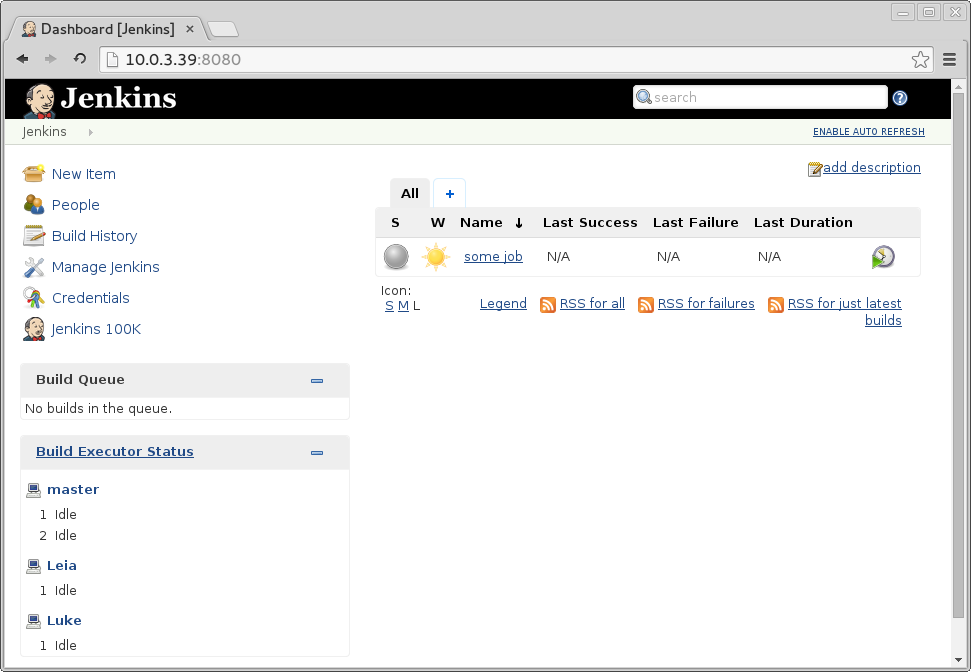
This will pull centos7-java image from Docker Hub and start it. After this command ends you should be able to see Luke worker in "Build Executor Status" section on Jenkins.


Notes [important]

Only centos6-java and centos7-java are ready to use now with Vagrant Jenkins


Links

DJS Repository: https://github.com/rrader/docker-jenkins-slave

понедельник, 6 января 2014 г.

Enabling Neutron in Devstack 2.0

Setting up devstack on vagrant machine with Docker hypervisor and Neutron enabled. In this article Neutron will be configured with Linux Bridge plugin.

My previous article about enabling neutron in devstack didn't take in account that I need to set up virtualbox machine and hypervisor will be Docker. Nova's Docker plugin doesn't work with openvswitch, so I had to turn back to linux bridge.

So, let's configure our machine:

Vagrantfile

Vagrantfile should have these lines:
 config.vm.network :private_network, ip:"172.16.0.201", :netmask => "255.255.0.0"
 config.vm.network :private_network, ip:"10.10.0.201", :netmask => "255.255.0.0"

This will configure two host-only interfaces, one for internal network (provider network), second for external (floating IPs).

localrc

should containe these lines:

# Use Docker hypervisor for Nova
VIRT_DRIVER=docker

# IP of vagrant box (and Horizon)
HOST_IP=172.16.0.201

# Networks
VLAN_INTERFACE=eth1
FLAT_INTERFACE=eth1
GUEST_INTERFACE=eth1
PUBLIC_INTERFACE=eth2
FIXED_RANGE=172.16.1.0/24
NETWORK_GATEWAY=172.16.1.1
FIXED_NETWORK_SIZE=256
FLOATING_RANGE=10.10.1.0/24

# Enable Neutron
enable_service q-svc q-agt q-dhcp q-l3 q-meta q-lbaas neutron

# Disable Cinder service
disable_service c-api c-sch c-vol

# Disable security groups
Q_USE_SECGROUP=False
LIBVIRT_FIREWALL_DRIVER=nova.virt.firewall.NoopFirewallDriver

# neutron linuxbridge
Q_PLUGIN=linuxbridge
Q_AGENT=linuxbridge

Bridge driver

Surely we don't need to replace bridge with brcompat in our case (we don't need OVS at all), so skip this step and leave as is (make sure in localrc you have Q_PLUGIN=linuxbridge)

VirtualBox configuration

Possibly you will need to configure VirtualBox host-only interfaces before spinning up vagrant,  (you can skip this step - interfaces will be created automatically), you can use this script

#!/bin/bash

# Private Network  vboxnet0 (172.16.0.0/16)
VBoxManage hostonlyif create
VBoxManage hostonlyif ipconfig vboxnet0 --ip 172.16.0.254 --netmask 255.255.0.0

# Public Network vboxnet1 (10.10.0.0/16)
VBoxManage hostonlyif create
VBoxManage hostonlyif ipconfig vboxnet1 --ip 10.10.0.1 --netmask 255.255.0.0

Final steps

Build devstack as usual (stack$ ./stack.sh)
To check all set up ok, go to Horizon interface (http://172.16.0.201 if you followed this manual) and check if your router (under demo tenant) has two interfaces, private network and gateway.

Finally, push some images to registry and spin up instances.

Note, that you will no have ability to ping/get to instances from your global namespace, use 
# ip netns
command to list all namespaces, and use
# ip netns exec <namespace id> <command>
Usually, all instances can be accessed from router namespace (qrouter-xxxxx namespace). For example, I have up instance with web server on 8000 port, on 10.10.1.2 .
To access it I can do:
# ip netns
qlbaas-1cd37d1d-a5c8-4dcc-8c78-4edb550e5159
...
7a078076c5c7dde649f53291ae7d7a9e698a262fe3225153c737b33725af40a1
...
qrouter-0588fbc8-da2e-46b0-a093-0258a702a168

# ip netns exec qrouter-0588fbc8-da2e-46b0-a093-0258a702a168 wget 10.10.1.2

Now all seems works, I still have no access to instances from external network though.


воскресенье, 26 мая 2013 г.

Vagrant-machine with OpenLDAP

Hi everyone

It could be useful to quickly deploy LDAP server to check configuration of client. For example, for django-auth-ldap.

Below listed configuration with 3 ldif files for authentication: base.ldif, group.ldif, passwd.ldif


$ tree
.
├── Vagrantfile
├── ldif
│   ├── base.ldif
│   ├── group.ldif
│   └── passwd.ldif
└── manifests
    └── base.pp